Picrew-Style Avatar Maker: Create a Custom Square Character Online
Love Picrew? Learn how a Picrew-style avatar maker works, why mix-and-match character creators are so popular, and how to build your own custom square character online for free.
If you have spent any time on social media in the last few years, you have seen a Picrew avatar. They show up in Twitter bios, Discord profiles, Reddit icons, and group chats — small, stylized characters built from layered parts, each one unmistakably hand-picked by the person behind it. A Picrew-style avatar maker takes that same idea — pick a face, pick eyes, pick hair, pick accessories, choose your colors — and lets you assemble a character that actually looks like you, or whoever you want to be online.
This article is about why that mix-and-match format caught on, how it works, and how to build your own custom square character online for free without signing up for anything.
Why Picrew-style makers are so popular
Picrew itself is a Japanese site where illustrators upload their own part sets and anyone can build an avatar from them. But the format spread far beyond one website because it solves three real problems at once.
- Self-expression without drawing skill. Most people cannot illustrate a portrait of themselves. A part-picker lets them design a character that still feels personal, because every choice — the hairstyle, the eye shape, the little headphones — is theirs.
- Speed. A full illustration takes hours. A mix-and-match avatar takes about two minutes, and you can change your mind instantly.
- Identity across platforms. Once you have a character you like, you can use the same square avatar on Discord, a forum, a game profile, and a blog. It becomes a recognizable version of you.
There is also a quieter appeal: it is calming. Choosing parts layer by layer is a small, satisfying act of creation, and the result is something you actually want to look at every day.
How a Picrew-style maker works
The mechanics are simple, and that is the whole point. You build a character one layer at a time, top to bottom:
- Pick a face. Skin tone, face shape, and base style set the foundation everything else sits on.
- Choose eyes. Eye shape, size, and color are where most of the personality lives — wide eyes read friendly, narrow eyes read cool or serious.
- Add hair. Hairstyle and hair color usually have the biggest single impact on how the character reads.
- Layer on accessories. Glasses, hats, headphones, earrings, masks — these are the details that make the avatar feel like a specific person.
- Pick a background or outfit. Some makers stop at the neck; others let you choose clothing and a backdrop color.
- Export as a square. The finished avatar should download as a 1:1 PNG ready for a profile picture, with no resizing required.
The best part of the format is that nothing is permanent. Do not like how the bangs sit with those glasses? Swap one of them. You are editing a recipe, not redrawing a painting.
Making a Picrew-style square avatar here
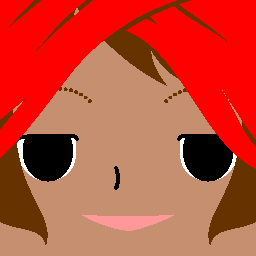
If you want to skip the sign-ups and the watermark drama, you can build a Picrew-style square character right here in your browser. The Square Face Icon Generator works the same way as a part-picker: it is a character creator focused on bold, readable square avatars.
The workflow is friendly and fast:
- Start generating. Open the generator and you immediately see a square face on the canvas — no login, no setup.
- Randomize for inspiration. Not sure where to begin? Hit randomize to roll a full character — face, eyes, hair, the lot — and use that as a starting point. Most people randomize a few times, land on something close, then refine.
- Treat it like Picrew layers. Think in the same layer order — face, eyes, hair, accessories — and nudge the options until the character feels right.
- Export a clean square PNG. When you are done, the download is a 256×256 square PNG with no watermark, ready to upload straight to Discord, Reddit, GitHub, or anywhere else that wants a square profile picture.
Because the generator runs locally in your browser, your character never gets uploaded anywhere. There is no account to make and no email to hand over.
Where to use your avatar
Once you have a square character you are happy with, it works almost everywhere:
- Discord. A bold, simple face reads cleanly at the tiny 24px chat icon size. Upload at 256×256 or larger so it stays sharp.
- Reddit and GitHub. Both display square avatars; a stylized character stands out in a feed of default icons.
- Game forums and profiles. Steam, itch.io, and most game communities accept square avatars. A custom character is more memorable than a stock logo.
- Stories and blogs. If you write fiction, run a newsletter, or post serialized stories, a consistent character avatar becomes a stand-in for a character or narrator.
- Group chats and side projects. Matching custom avatars are a fun identity marker for a team, a D&D party, or a friend group.
Tips for a cohesive character
The difference between a generic avatar and one that feels intentional is usually restraint. A few habits help:
- Commit to a palette. Pick three or four colors — for skin, hair, clothing, and background — that sit well together. A limited palette looks designed; a rainbow of unrelated colors looks random.
- Pick a style and stay in it. If your face base is soft and round, avoid sharp angular accessories. Mixing visual styles in one avatar is the most common reason a character looks off.
- One focal accessory. Choose a single standout detail — a pair of headphones, a hat, a specific glasses shape — and let the rest support it. Too many competing accessories and nothing reads.
- Check it small. Squint at the canvas or step back from your screen. If the character is still recognizable at a tiny size, it will work as a profile picture. If it turns into a smudge, simplify.
- Save variations. Once you have a base you like, save a few color or accessory variants. It is handy to have a "summer" and "winter" version of the same character.
Build your Picrew-style avatar now
A Picrew-style avatar maker is the easiest way to end up with a custom square character that actually feels like you — no drawing, no sign-up, no watermark. Open the Square Face Icon Generator and build yours in the next couple of minutes.
.png)
.png)